If you want something forbidden really bad, then it is allowed. Russian proverb
Simplicity vs Reliability
Back in 2005, in the newly released MetaTrader 4,
the simple MQL-II script language was replaced by MQL4. As funny as it
may seem today, many traders met the new C-like language with hostility.
There were many furious debates and accusations directed at MetaQuotes
Software Corp. Critics claimed that the language was very complicated
and it was impossible to master it.
Now, after 12 years, such claims seem strange but the history
repeats itself. Just like in 2005, some traders declare that MQL5 is
complicated for learning and developing strategies compared to MQL4.
This means that the overall level of developing trading robots has grown
substantially over the years thanks to the fact that the developer was
not afraid to move on providing algorithmic traders with even more
powerful tools of the C++ language. The new MQL5 allows programmers to
check results of all operations in maximum detail (this is especially
important for handling trades) and consume RAM on demand. The old MQL4
provided much less opportunities of that kind before it was improved to
MQL5 level. Besides, the syntax itself was less strict.
I believe, that debates about MQL5 complexity will also pass into
oblivion after a short while. But since many traders still feel
nostalgic about "good old MQL4", we will try to show how familiar MQL4
functions may look if implemented in MQL5.
If you have newly switched to MQL5, then this article will be
useful. First, the access to the indicator data and series is done in
the usual MQL4 style. Second, this entire simplicity is implemented in
MQL5. All functions are as clear as possible and perfectly suited for
step-by-step debugging.
1. Is it possible to work with indicator in MQL5 using MQL4 style?
The main difference in working with indicators is that in MQL4, the indicator data retrieval string
is, in fact, the indicator creation command
( iMACD(NULL,0,12,26,9,PRICE_CLOSE ) combined with request for data
from the necessary indicator buffer ( MODE_MAIN ) and index ( 1 ).
#property copyright "Copyright © 2018, Vladimir Karputov"
#property link "http://wmua.ru/slesar/"
#property version "1.00"
#property strict
int OnInit()
{
return(INIT_SUCCEEDED);
}
void OnDeinit(const int reason)
{
}
void OnTick()
{
double macd_main_1=iMACD(NULL,0,12,26,9,PRICE_CLOSE,MODE_MAIN,1);
}
As a result, a single string stands for only a single step.
In MQL5, the equivalent of this code contains several steps:
- declaring the variable where the indicator handle is to be stored;
- creating and checking the indicator handle;
- separate function providing the indicator value.
#property copyright "Copyright © 2018, Vladimir Karputov"
#property link "http://wmua.ru/slesar/"
#property version "1.000"
int handle_iMACD;
int OnInit()
{
handle_iMACD=iMACD(Symbol(),Period(),12,26,9,PRICE_CLOSE);
if(handle_iMACD==INVALID_HANDLE)
{
PrintFormat("Failed to create handle of the iMACD indicator for the symbol %s/%s, error code %d",
Symbol(),
EnumToString(Period()),
GetLastError());
return(INIT_FAILED);
}
return(INIT_SUCCEEDED);
}
void OnDeinit(const int reason)
{
}
void OnTick()
{
double macd_main_1=iMACDGet(MAIN_LINE,1);
}
double iMACDGet(const int buffer,const int index)
{
double MACD[1];
ResetLastError();
if(CopyBuffer(handle_iMACD,buffer,index,1,MACD)<0)
{
PrintFormat("Failed to copy data from the iMACD indicator, error code %d",GetLastError());
return(0.0);
}
return(MACD[0]);
}
Let's re-write the code in MQL4 style.
Creating the indicator handle and obtaining the indicator data will be implemented in a single function:
double iMACD(
string symbol,
ENUM_TIMEFRAMES period,
int fast_ema_period,
int slow_ema_period,
int signal_period,
ENUM_APPLIED_PRICE applied_price,
int buffer,
int shift
)
{
double result=NULL;
int handle=iMACD(symbol,period,fast_ema_period,slow_ema_period,signal_period,
applied_price);
double val[1];
int copied=CopyBuffer(handle,buffer,shift,1,val);
if(copied>0)
result=val[0];
return(result);
}
NOTE! After writing the function, we will create the indicator handle ON EVERY tick. You may say that the documentation does not recommend such "creativity". Let's have a look at the Technical Indicator Functions section:
You can't refer to the indicator data right after it has been
created, because calculation of indicator values requires some time. So it's better to create indicator handles in OnInit().
So why does this code work and not consume memory? The answer is in the same section:
Note. Repeated
call of the indicator function with the same parameters within one
mql5-program does not lead to a multiple increase of the reference
counter; the counter will be increased only once by 1. However, it's recommended to get the indicators handles in function OnInit() or
in the class constructor, and further use these handles in other
functions. The reference counter decreases when a mql5-program is
deinitialized.
In other words, MQL5 is optimally designed: it controls the
creation of the handles and does not allow creating the same indicator
with the same parameters many times. In case of repeated attempts to
create a handle which is a copy of the indicator, you simply get the
handle of the previously created indicator with the corresponding
settings. Anyway, it is still recommended to receive the handles a
single time in OnInit (). The reasons will be provided later.
Note: there is no check for the validity of the generated handle.
Now, the code that receives iMACD indicator values will look like this:
#property copyright "Copyright © 2018, Vladimir Karputov"
#property link "http://wmua.ru/slesar/"
#property version "1.000"
#define MODE_MAIN 0
#define MODE_SIGNAL 1
int OnInit()
{
return(INIT_SUCCEEDED);
}
void OnDeinit(const int reason)
{
}
void OnTick()
{
double macd_main_1=iMACD(NULL,0,12,26,9,PRICE_CLOSE,MODE_MAIN,1);
}
double iMACD(
string symbol,
ENUM_TIMEFRAMES period,
int fast_ema_period,
int slow_ema_period,
int signal_period,
ENUM_APPLIED_PRICE applied_price,
int buffer,
int shift
)
{
double result=NULL;
int handle=iMACD(symbol,period,fast_ema_period,slow_ema_period,signal_period,
applied_price);
double val[1];
int copied=CopyBuffer(handle,buffer,shift,1,val);
if(copied>0)
result=val[0];
return(result);
}
NOTE: Desire to access indicators in MQL4 style deprives us of
the option of checking the return value, since all functions in MQL4
style return ONLY 'double' values. A possible solution will be provided
in the section 1.1.
It looks pretty cumbersome so far, therefore let's implement the 'define' block and the double iMACD() function in a separate IndicatorsMQL5.mqh include file to be located in a separate folder "[data folder]\MQL5\Include\SimpleCall". In this case, the code becomes pretty short. Please note that we include the IndicatorsMQL5.mqh
file. This means that the names of the indicator lines should be
transferred in the form of MQL5 MAIN_LINE rather than MQL4 MODE_MAIN
when accessing the MACD:
#property copyright "Copyright © 2018, Vladimir Karputov"
#property link "http://wmua.ru/slesar/"
#property version "1.000"
#include <SimpleCall\IndicatorsMQL5.mqh>
int OnInit()
{
return(INIT_SUCCEEDED);
}
void OnDeinit(const int reason)
{
}
void OnTick()
{
double macd_main_1=iMACD(NULL,0,12,26,9,PRICE_CLOSE,MAIN_LINE,1);
Comment("MACD, main buffer, index 1: ",DoubleToString(macd_main_1,Digits()+1));
}
I have implemented "Comment" solely for verification. You can
verify the work in the tester if you launch "MACD MQL4 style EA
short.mq5" in visual mode and place the cursor on the bar with the index
#1:
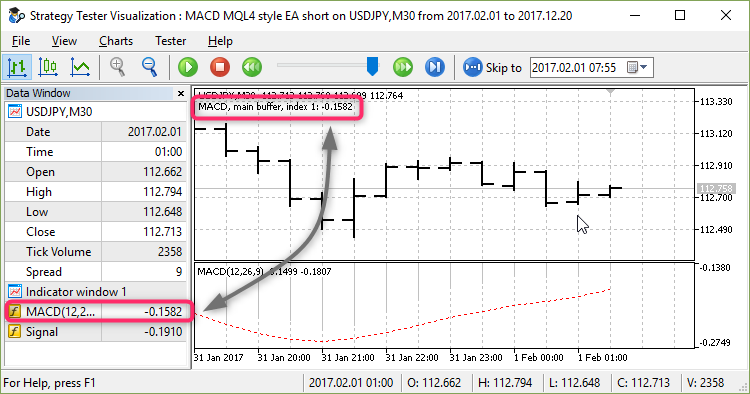
Fig. 1. "MACD MQL4 style EA short.mh5" in tester
1.1. Some nuances when working with "IndicatorsXXXX.mqh"
Error handling in a return value
All indicators pass their data as double. This is an issue of
sending a message to a user if it has suddenly become impossible to
obtain data from the indicator. This may happen if the indicator handle
is not created (for example, if a non-existent symbol is specified) or
if a copy error occurred while calling CopyBuffer.
Simply passing "0.0" in case of an error is not an option since for
most indicators "0.0" is a quite normal value (for example, for MACD).
Returning the EMPTY_VALUE constant (having the value of DBL_MAX) is
not an option either, since the Fractals indicator fills in the buffer
indices by EMPTY_VALUE values meaning this is not an error.
The only remaining option is to pass "not a number" — NaN. To achieve this, the NaN variable is created on a global level. The variable is initialized by a "non-number":
double NaN=double("nan");
double iAC(
string symbol,
ENUM_TIMEFRAMES timeframe,
int shift
)
{
double result=NaN;
int handle=iAC(symbol,timeframe);
if(handle==INVALID_HANDLE)
{
Print(__FUNCTION__,": INVALID_HANDLE error=",GetLastError());
return(result);
}
double val[1];
int copied=CopyBuffer(handle,0,shift,1,val);
if(copied>0)
result=val[0];
else
Print(__FUNCTION__,": CopyBuffer error=",GetLastError());
return(result);
}
The advantage of this approach is also that NaN is returned in case
of an error, and the result of its comparison with any number will be
'false'.
void OnStart()
{
double NaN=double("nan");
double a=10.3;
double b=-5;
double otherNaN=double("nan");
Print("NaN>10.3=",NaN>a);
Print("NaN<-5=",NaN<b);
Print("(NaN==0)=",NaN==0);
Print("(NaN==NaN)=",NaN==otherNaN);
NaN>10.3=false
NaN<-5=false
(NaN==0)=false
(NaN==NaN)=false
}
Therefore, if we want to use these functions in MQL4 style, then it
is necessary to conduct trading operations (as well as any other
important actions) only if the result of the comparison is true. Although in this case, I insist on checking the return value using the MathIsValidNumber function.
Identifiers of indicator lines in MQL4 and MQL5
There is a compatibility issue in the part of the values of
constants that describe the indicator lines. For example, let's
take iAlligator:
- MQL4: 1 - MODE_GATORJAW, 2 - MODE_GATORTEETH, 3 - MODE_GATORLIPS
- MQL5: 0 - GATORJAW_LINE, 1 - GATORTEETH_LINE, 2 - GATORLIPS_LINE
The issue is that the indicator line in the "IndicatorsXXXX.mqh"
function comes as a number. If this number, for example, is 1, then no
one can say what the user meant: either they worked in MQL4 style (and
had in mind 1 - MODE_GATORJAW), or they worked in the MQL5 style (and
had in mind a completely different indicator line 1 - GATORTEETH_LINE).
In this regard, I decided to create two include files - practically twins: "IndicatorsMQL4.mqh" and "IndicatorsMQL5.mqh".
Their difference is that the "IndicatorsMQL4.mqh" file understands
indicator lines ONLY in MQL4 style, while the file "IndicatorsMQL5.mqh"
understands indicator lines ONLY in MQL5 style. In "IndicatorsMQL4.mqh",
transformation of the indicator line in the input parameter is
performed directly inside the iADX, iAlligator ... functions — you
cannot relocate these transformations to #define.
Let me explain the reason for this on the example of iBands and iEnvelopes:
double iBands(
...
double iEnvelopes(
In MQL4, MODE_UPPER for Bands indicator, is transformed into 1, while for Envelopes indicator, it is transformed into 0.
2. What is the memory consumption if we apply indicators in MQL4 style at each tick?
Let's compare the memory consumption of the two EAs: "iMACD.mq5" —
the EA with correct access to the indicators and the "MACD MQL4 style EA
short.mq5" — with access to MQL4 style indicators. The maximum number
of bats in the window is set to "100 000" in the terminal settings.
Create two profiles of 14 charts:
- "iMACd" profile — "iMACd.mq5" EA is set on 13 charts, all charts are of M30 timeframe;
- "MACD MQL4 style EA short" profile — "MACD MQL4 style EA short.mq5" EA is set on 13 charts.
"Terminal memory used.mq5" indicator is launched on the fourteenth chart. Its objective is to print TERMINAL_MEMORY_USED identifier every 10 seconds.
We will compare two values: amount of RAM consumed by the terminal (task manager data) the printed TERMINAL_MEMORY_USED
identifier. The observation will be conducted for 10 minutes — we will
see if too much memory is consumed. The main condition: after starting
the terminal, do nothing in it - do not open new tabs or read the chat.
| Profile |
Task manager |
TERMINAL_MEMORY_USED |
Task manager (in 10 minutes) |
TERMINAL_MEMORY_USED (in 10 minutes) |
| iMACd |
279.7 MB |
745 MB |
279.7 MB |
745 MB |
| MACD MQL4 style EA short |
279.9 MB |
745 MB |
280.0 MB |
745 MB |
Now, let's modify the test: after 10 minutes of work, switch the timeframes of all charts to H1.
| Profile |
Task manager |
TERMINAL_MEMORY_USED |
Task manager (in 10 minutes) |
TERMINAL_MEMORY_USED (in 10 minutes) |
| iMACd |
398.0 MB |
869 MB |
398.3 MB |
869 MB |
| MACD MQL4 style EA short |
319.2 MB |
874 MB |
330.5 MB |
874 MB |
Summary table for clarity of memory usage:
| Profile |
Task manager
(M30), MB |
TERMINAL_MEMORY_USED
(M30), MB |
Task manager
(H1), MB |
TERMINAL_MEMORY_USED
(H1), MB |
|
start |
in 10 minutes |
start |
in 10 minutes |
start |
in 10 minutes |
start |
in 10 minutes |
| iMACd |
279.7 |
279.7 |
745 |
745 |
398.0 |
869 |
398.3 |
869 |
| MACD MQL4 style EA short |
279.9 |
280.0 |
745 |
745 |
319.2 |
874 |
330.5 |
874 |
3. The new life of MACD Sample.mq4 EA
Let's check the execution speed, memory consumption and [data
folder]\MQL4\Experts\MACD Sample.mq4 EA (developed in MQL5 but in MQL4
style like "MACD MQL4 style EA short.mq5") compliance with [data
folder]\MQL5\Experts\Examples\MACD\MACD Sample.mq5 EA.
3.1. Let's change "MACD Sample.mq5" EA, so that it receives one value at a time
"MACD Sample.mq5" from the standard delivery receives two indicator values at once:
bool CSampleExpert::Processing(void)
{
if(!m_symbol.RefreshRates())
return(false);
if(BarsCalculated(m_handle_macd)<2 || BarsCalculated(m_handle_ema)<2)
return(false);
if(CopyBuffer(m_handle_macd,0,0,2,m_buff_MACD_main) !=2 ||
CopyBuffer(m_handle_macd,1,0,2,m_buff_MACD_signal)!=2 ||
CopyBuffer(m_handle_ema,0,0,2,m_buff_EMA) !=2)
return(false);
m_macd_current =m_buff_MACD_main[0];
m_macd_previous =m_buff_MACD_main[1];
m_signal_current =m_buff_MACD_signal[0];
m_signal_previous=m_buff_MACD_signal[1];
m_ema_current =m_buff_EMA[0];
m_ema_previous =m_buff_EMA[1];
After that, data from arrays of dimension "2" are assigned to the
variables. Why is it done this way? Regardless of whether we copy by one
or two values per time, we still use CopyBuffer. However, when copying two values at once, we save one operation of writing to the array.
But "MACD Sample.mq4" EA receives one indicator value per time:
MacdCurrent=iMACD(NULL,0,12,26,9,PRICE_CLOSE,MODE_MAIN,0);
MacdPrevious=iMACD(NULL,0,12,26,9,PRICE_CLOSE,MODE_MAIN,1);
SignalCurrent=iMACD(NULL,0,12,26,9,PRICE_CLOSE,MODE_SIGNAL,0);
SignalPrevious=iMACD(NULL,0,12,26,9,PRICE_CLOSE,MODE_SIGNAL,1);
MaCurrent=iMA(NULL,0,MATrendPeriod,0,MODE_EMA,PRICE_CLOSE,0);
MaPrevious=iMA(NULL,0,MATrendPeriod,0,MODE_EMA,PRICE_CLOSE,1);
The MACD main line, MACD signal line and Moving Average are surveyed two times each. Therefore, "MACD Sample.mq5" should be brought to the same form. Let's call this EA version "MACD Sample One value at a time.mq5". Here is how it is changed, so that we receive one value at a time:
if(BarsCalculated(m_handle_macd)<2 || BarsCalculated(m_handle_ema)<2)
return(false);
CopyBuffer(m_handle_macd,0,0,1,m_buff_MACD_main);
m_macd_current=m_buff_MACD_main[0];
CopyBuffer(m_handle_macd,0,1,1,m_buff_MACD_main);
m_macd_previous=m_buff_MACD_main[0];
CopyBuffer(m_handle_macd,1,0,1,m_buff_MACD_signal);
m_signal_current=m_buff_MACD_signal[0];
CopyBuffer(m_handle_macd,1,1,1,m_buff_MACD_signal);
m_signal_previous=m_buff_MACD_signal[0];
CopyBuffer(m_handle_ema,0,0,1,m_buff_EMA);
m_ema_current=m_buff_EMA[0];
CopyBuffer(m_handle_ema,0,1,1,m_buff_EMA);
m_ema_previous=m_buff_EMA[0];
This code is saved in "MACD Sample One value at a time.mq5" attached in the end of the article.
3.2. Convert "MACD Sample.mq4" into MQL5 code
To be able to access the indicators in MQL4 style, as well as work
with positions and trade, we should include the "IndicatorsMQL4.mqh"
file (as you remember, this file understands only MQL4 names of
indicator lines) and CPositionInfo, CTrade, CSymbolInfo and CAccountInfo
trading classes. Also, the block of 'defines' — indicator line names —
should be added to the EA to properly access the indicators in
"IndicatorsMQL4.mqh":
#property description " and the indicators are accessed in the style of MQL4"
#define MODE_MAIN 0
#define MODE_SIGNAL 1
#include <SimpleCall\IndicatorsMQL4.mqh>
#include <Trade\PositionInfo.mqh>
#include <Trade\Trade.mqh>
#include <Trade\SymbolInfo.mqh>
#include <Trade\AccountInfo.mqh>
CPositionInfo m_position;
CTrade m_trade;
CSymbolInfo m_symbol;
CAccountInfo m_account;
input double TakeProfit =50;
Also, the special multiplier is required for adjusting to three- and five-digit quotes:
input double MACDCloseLevel=2;
input int MATrendPeriod =26;
double m_adjusted_point;
To receive the current prices, I use the m_symbol object of the CSymbolInfo trading class:
int OnInit()
{
if(!m_symbol.Name(Symbol()))
return(INIT_FAILED);
RefreshRates();
RefreshRates() method updates prices and makes sure there are no prices equal to "0.0":
bool RefreshRates(void)
{
if(!m_symbol.RefreshRates())
{
Print("RefreshRates error");
return(false);
}
if(m_symbol.Ask()==0 || m_symbol.Bid()==0)
return(false);
return(true);
}
The m_adjusted_point multiplier is initialized in OnInit() after initializing the m_symbol object:
int OnInit()
{
if(!m_symbol.Name(Symbol()))
return(INIT_FAILED);
RefreshRates();
int digits_adjust=1;
if(m_symbol.Digits()==3 || m_symbol.Digits()==5)
digits_adjust=10;
m_adjusted_point=m_symbol.Point()*digits_adjust;
return(INIT_SUCCEEDED);
}
In OnTick() we access the indicators in MQL4 style thanks to "IndicatorsMQL4Style.mqh":
if(!RefreshRates())
return;
MacdCurrent=iMACD(NULL,0,12,26,9,PRICE_CLOSE,MAIN_LINE,0);
MacdPrevious=iMACD(NULL,0,12,26,9,PRICE_CLOSE,MAIN_LINE,1);
SignalCurrent=iMACD(NULL,0,12,26,9,PRICE_CLOSE,SIGNAL_LINE,0);
SignalPrevious=iMACD(NULL,0,12,26,9,PRICE_CLOSE,SIGNAL_LINE,1);
MaCurrent=iMA(NULL,0,MATrendPeriod,0,MODE_EMA,PRICE_CLOSE,0);
MaPrevious=iMA(NULL,0,MATrendPeriod,0,MODE_EMA,PRICE_CLOSE,1);
3.2.1. Working with positions
For maximum compliance, determine the absence of positions as
   total=PositionsTotal();
   if(total<1)
     {
Although this approach is not entirely correct, since it does not
take into account the presence of positions on other symbols and/or with
other identifiers (magic numbers).
3.2.2. Buy positions are opened using Buy method of CTrade class, while execution correctness is verified by the ResultDeal method of the same class. ResultDeal returns a deal ticket if it is executed.
if(MacdCurrent<0 && MacdCurrent>SignalCurrent && MacdPrevious<SignalPrevious &&
MathAbs(MacdCurrent)>(MACDOpenLevel*m_adjusted_point) && MaCurrent>MaPrevious)
{
m_trade.Buy(Lots,m_symbol.Name(),m_symbol.Ask(),
0.0,
m_symbol.NormalizePrice(m_symbol.Ask()+TakeProfit*m_adjusted_point),
"macd sample");
if(m_trade.ResultDeal()!=0)
Print("BUY position opened : ",m_trade.ResultPrice());
else
Print("Error opening BUY position : ",m_trade.ResultRetcodeDescription());
return;
}
Note that the price in a trade request is normalized using the NormalizePrice
method of CSymbolInfo trading class. This method allows
considering quantization: minimum price change and number of decimal
places.
The same methods are used to open a Sell position.
3.2.3. Positions bypass block: Closing or modification.
The loop itself is passed from the common number of positions minus one up to zero inclusive. To be able to work with a position, first, we need to select it by index in the general list:
for(int i=PositionsTotal()-1;i>=0;i--)
if(m_position.SelectByIndex(i))
The position is closed using the PositionClose method, while modification is done by PositionModify. Note that modification allows using the NormalizePrice method of the CSymbolInfo trading class.
The entire position bypass block:
for(int i=PositionsTotal()-1;i>=0;i--)
if(m_position.SelectByIndex(i))
if(m_position.Symbol()==m_symbol.Name())
{
if(m_position.PositionType()==POSITION_TYPE_BUY)
{
if(MacdCurrent>0 && MacdCurrent<SignalCurrent && MacdPrevious>SignalPrevious &&
MacdCurrent>(MACDCloseLevel*m_adjusted_point))
{
if(!m_trade.PositionClose(m_position.Ticket()))
Print("PositionClose error ",m_trade.ResultRetcodeDescription());
return;
}
if(TrailingStop>0)
{
if(m_position.PriceCurrent()-m_position.PriceOpen()>m_adjusted_point*TrailingStop)
{
if(m_position.StopLoss()<m_symbol.Bid()-m_adjusted_point*TrailingStop)
{
if(!m_trade.PositionModify(m_position.Ticket(),
m_symbol.NormalizePrice(m_position.PriceCurrent()-m_adjusted_point*TrailingStop),
m_position.TakeProfit()))
Print("PositionModify error ",m_trade.ResultRetcodeDescription());
return;
}
}
}
}
if(m_position.PositionType()==POSITION_TYPE_SELL)
{
if(MacdCurrent<0 && MacdCurrent>SignalCurrent &&
MacdPrevious<SignalPrevious && MathAbs(MacdCurrent)>(MACDCloseLevel*m_adjusted_point))
{
if(!m_trade.PositionClose(m_position.Ticket()))
Print("PositionClose error ",m_trade.ResultRetcodeDescription());
return;
}
if(TrailingStop>0)
{
if((m_position.PriceOpen()-m_position.PriceCurrent())>(m_adjusted_point*TrailingStop))
{
if((m_position.StopLoss()>(m_symbol.Ask()+m_adjusted_point*TrailingStop)) || (m_position.StopLoss()==0.0))
{
if(!m_trade.PositionModify(m_position.Ticket(),
m_symbol.NormalizePrice(m_symbol.Ask()+m_adjusted_point*TrailingStop),
m_position.TakeProfit()))
Print("PositionModify error ",m_trade.ResultRetcodeDescription());
return;
}
}
}
}
}
We are done with all the changes. The final file "MACD Sample 4 to 5 MQL4 style.mq5" is attached below.
3.3. Let's compare the speed of executing MACD-based EAs
The following EAs will be used for comparison:
- "MACD Sample.mq5" — EA from the standard delivery with correct access to indicators
- "MACD Sample One value at a time.mq5" — equivalent of "MACD Sample.mq5", where we obtain one value from the indicators per time
- "MACD Sample 4 to 5 MQL4 style.mq5" — MQL4 EA converted to MQL5 with minimum modifications and access to MQL4 style indicators
The test was performed on USDJPY M30 from 2017.02.01 to 2018.01.16
on MetaQuotes-Demo server. The terminal was reset after each test
(whether it was switching EAs or toggling tick generation modes). PC
configuration:
Windows 10 (build 16299) x64, IE 11, UAC, Intel Core i3-3120M @ 2.50GHz, Memory: 4217 / 8077 Mb, Disk: 335 / 464 Gb, GMT+2
| # |
Expert Advisor |
Every tick based on real ticks |
Every tick |
OHLC |
|
|
Test time |
Trades |
Deals |
Test time |
Trades |
Deals |
Test time |
Trades |
Deals |
| 1 |
MACD Sample.mq5 |
0:01:19.485 |
122 |
244 |
0:00:53.750 |
122 |
244 |
0:00:03.735 |
119 |
238 |
| 2 |
MACD Sample One value at a time.mq5 |
0:01:20.344 |
122 |
244 |
0:00:56.297 |
122 |
244 |
0:00:03.687 |
119 |
238 |
| 3 |
MACD Sample 4 to 5 MQL4 style.mq5 |
0:02:37.422 |
122 |
244 |
0:01:52.171 |
122 |
244 |
0:00:06.312 |
119 |
238 |
All three EAs demonstrated similar charts in "Every tick mode":
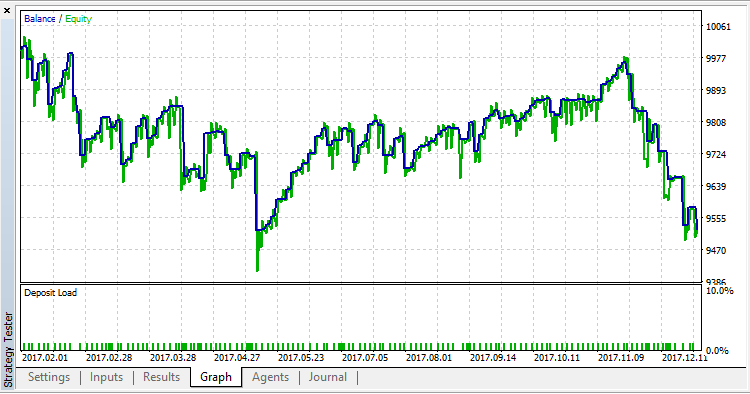
Fig. 2. MACD Sample XXXX in the strategy tester
CONCLUSION: "MACD Sample 4 to 5 MQL4 style.mq5" EA having access to indicators in MQL4 style is twice slower compared to similar EAs having correct access to indicators.
3.4. Let's compare MACD-based EAs' memory consumption
The same 14 charts are used for that, as in point 2. What happens
to memory consumption if we apply indicators in MQL4 style at each tick?
"Terminal memory used.mq5" indicator is always left on the first chart.
It prints TERMINAL_MEMORY_USED
ID every 10 seconds, while the EAs are launched on the remaining 13
ones one-by-one. The terminal is reset before each measurement.
| # |
Expert Advisor |
Task manager, MB |
TERMINAL_MEMORY_USED, Мб |
| 1 |
MACD Sample.mq5 |
334.6 |
813 |
| 2 |
MACD Sample One value at a time.mq5 |
335.8 |
813 |
| 3 |
MACD Sample 4 to 5 MQL4 style.mq5 |
342.2 |
818 |
CONCLUSION: MACD-based EAs with correct access to the indicators
and the MACD-based EA with access to the indicators in MQL4 style are
comparable in terms of memory consumption. They consume approximately
the same amount of memory.
4. The new life of [data folder]\MQL4\Experts\Moving Average.mq4 EA
In the previous section, we converted MQL4 into MQL5. As for
Movinge Average.mq4, I suggest to simply change Moving Average.mq5
by including "IndicatorsMQL5.mqh" file
#property version   "1.00"
#include <SimpleCall\IndicatorsMQL5.mqh>

#include <Trade\Trade.mqh>
and replacing CopyBuffer
double ma[1];
if(CopyBuffer(ExtHandle,0,0,1,ma)!=1)
{
Print("CopyBuffer from iMA failed, no data");
return;
}
with MQL4 style of accessing the indicators:
ma=iMA(NULL,0,MovingPeriod,MovingShift,MODE_SMA,PRICE_CLOSE,0);
This leaves us with just one option of checking the operation
result — compare the obtained data with zero. Considering this, the
final entry in the "CheckForOpen" and "CheckForClose" blocks looked as
follows:
double ma[1];
if(CopyBuffer(ExtHandle,0,0,1,ma)!=1)
{
Print("CopyBuffer from iMA failed, no data");
return;
}
and is about to look like this:
double ma[1];
ma[0]=iMA(_Symbol,_Period,MovingPeriod,MovingShift,MODE_SMA,PRICE_CLOSE,0);
if(ma[0]==0.0)
{
Print("Get iMA in MQL4 style failed, no data");
return;
}
These are the changes we are going to save in the "Moving Average
MQL4 style.mq5" EA. The EA is attached below. Let's measure the
performance and memory consumption between the standard "Moving
Average.mq5" and "Moving Average MQL4 style.mq5".
As you may remember, the tests were performed on the following system
Windows 10 (build 16299) x64, IE 11, UAC, Intel Core i3-3120M @ 2.50GHz, Memory: 4217 / 8077 Mb, Disk: 335 / 464 Gb, GMT+2
The terminal was reset after each test. The tests were conducted on EURUSD M15 from 2017.02.01 to 2018.01.16 on MetaQuotes-Demo server.
| # |
Expert Advisor |
Every tick based on real ticks |
Every tick |
OHLC |
|
|
Test time |
Trades |
Deals |
Test time |
Trades |
Deals |
Test time |
Trades |
Deals |
| 1 |
Moving Average.mq5 |
0:00:33.359 |
1135 |
2270 |
0:00:22.562 |
1114 |
2228 |
0:00:02.531 |
1114 |
2228 |
| 2 |
Moving Average MQL4 style.mq5 |
0:00:34.984 |
1135 |
2270 |
0:00:23.750 |
1114 |
2228 |
0:00:02.578 |
1114 |
2228 |
CONCLUSION: The MQL5 core probably had to search among two
handles in MACD Sample at each tick when accessing the indicators in
MQL4 style. It was this search that took the most time.
In case of the Moving Average EA, when accessing the
indicator in MQL4 style, the MQL5 core spends no time in searching for a
necessary candle, since it is the only one.
Let's compare Moving Average-based EAs' memory consumption
The same 14 charts are used for that, as in point 2. "Terminal
memory used.mq5" indicator is always left on the first chart. It prints TERMINAL_MEMORY_USED
ID every 10 seconds, while the EAs are launched on the remaining 13
ones one-by-one. The terminal is reset before each measurement.
| # |
Expert Advisor |
Task manager, MB |
TERMINAL_MEMORY_USED, Мб |
| 1 |
Moving Average.mq5 |
295.6 |
771 |
| 2 |
Moving Average MQL4 style.mq5 |
283.6 |
760 |
CONCLUSION: The memory consumption is almost identical. Small
differences can be attributed to the terminal's "internal life": news
updates, etc.
5. Equivalents of iXXXX series
Since we executed the obtaining of indicator values in MQL4 style, let's write the functions of the "Access to Timeseries and Indicator Data" section. The implementation is done in [data folder]\MQL5\Include\SimpleCall\Series.mqh.
The list of functions in Series.mqh providing access to time series values as in MQL4:
The predefined IDs of the MODE_OPEN, MODE_LOW, MODE_HIGH,
MODE_CLOSE, MODE_VOLUME and MODE_TIME series are available for the
iHighest and iLowest functions.
Example of the iClose function implementation:
double iClose(
string symbol,
ENUM_TIMEFRAMES timeframe,
int shift
)
{
double result=0.0;
double val[1];
ResetLastError();
int copied=CopyClose(symbol,timeframe,shift,1,val);
if(copied>0)
result=val[0];
else
Print(__FUNCTION__,": CopyClose error=",GetLastError());
return(result);
}
shift bar Close price value is obtained using CopyClose — the first form of call (accessing by the initial position and the number of required elements):
int CopyClose(
string symbol_name,
ENUM_TIMEFRAMES timeframe,
int start_pos,
int count,
double close_array[]
);
Conclusion
As we can see, MQL5 allows MQL4 fans to obtain the values of
indicators and time series in their favorite style. They say that this
code is shorter and easier to read. Platform developers though require
more careful work with a code and maximum checks when calling functions
(and I fully agree with them). Let's list briefly the pros and cons of
the functions described in the article.
Cons:
- limitation in processing the returned error when accessing indicators;
- drop in test speed when accessing more than one indicator simultaneously;
- the need to correctly highlight the indicator lines depending on whether IndicatorsMQL5.mqh or IndicatorsMQL4.mqh is connected.
Pros
- simplicity of code writing — one string instead of multiple ones;
- visibility and conciseness — the less the code amount, the easier it is for understanding.
However, I remain committed to the classic MQL5 approach in accessing
indicators. In this article, I have only tested a possible alternative.


